Wolf Paulus

Journal

Navigation Menu

The $3 Arduino

Posted by on Oct 31, 2012 in Embedded

Buying and using an official Arduino Board like the standard Arduino Uno is the perfect way to get started with the Arduino language, common electronic components, or your own embedded prototyping project. However, once you have mastered the initial challenges and have built some projects, the Arduino Board can get in the way.

For instance, many enthusiasts, who started out with hacking and extending the Arduino hardware and software, have now moved on to the Raspberry Pi, which is equally or even less expensive, but more powerful and complete. The Raspberry Pi comes with Ethernet, USB, HDMI, Analog-Audio-Out, a lot of memory, and much more; adding all these capabilities to the Arduino with Arduino-Shields, would probably cost several hundred Dollars. However, the Raspberry lacks some of Arduino’s I/O capabilities like Analog-Inputs.
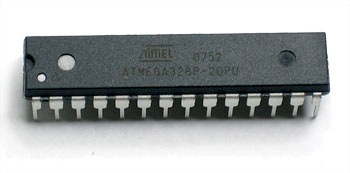
Combining an Arduino with a Raspberry Pi, may make sense for a lot of project; but we don’t need or want to integrate an Arduino Board – the Arduino’s core, the ATMEGA Microcontroller, is all what’s needed.

Read More

Arduino Pt.4

Posted by on Jan 31, 2009 in Embedded

Doubling the Arduino Flash Memory once again

Times really flys when you’re having fun – it has been more two years since I posted this journal entry about how to double the Arduino board’s Flash memory by replacing the ATmega8 with an ATmega168 microcontroller. Lots has changed since then, e.g. the Arduino project now includes several board designs and layouts, most of which feature the ATmega168.

For the last couple of months now, the even better AVR 8-Bit RISC ATmega328P micro-controller was hard get. However, it’s now more broadly available and four of these 8-Bit Micros have arrived today, shipped form one of my favorite Online-Electronics stores: SparkFun. The ATmega328P features 32 KBytes of Flash, 2 KBytes of RAM, and 1 KByte of EEPROM a nice improvement over Arduino’s original configuration with an ATmega8: (8 KBytes of flash, 1 KByte of RAM, and 512 Bytes of EEPROM).
Time to revisit the Arduino Project, an open-source electronics prototyping platform based on flexible, easy-to-use hardware and software, intended for anyone interested in creating interactive objects or environments.

Burn Baby Burn .. Again

The ATmega328 comes in the same 28-lead PDIP packaging and replacing the chip was straight forward and took only a couple of seconds; burning the boot loader on the other hand – just like last time – took a little longer. The Arduino board has the AVR typical 6 header ICSP, an in-system programming port, which allows burning a boot loader without removing the microcontroller chip from the board. At least for Mac users, I recommend AVR’s AVRISP mkII (ATAVRIPS2-ND), available for $34 at DigiKey.
The AVRISP can program newer 8-bit RISC microcontrollers (with ICSP Interface) through the USB port. The target board still needs to be powered and its regular ports should be disconnected from other devices.

Since switching form the ATmege8 to the 16, the Arduino’s Development Environment has also switched to avrdude, the software that loads programs from your machine onto the chips – manipulates the ROM and EEPROM contents of AVR microcontrollers. To use avrdude successfully with the new ATmega3258P, you may need to update its configuration file somewhere like here: /Applications/arduino-0013/hardware/tools/avr/etc, (look for the configuration file in theResources areas below).

Preparation …

At this point, the Arduino’s microcontroller had been replaced with the 32 KByte ATmega328P and everything but the ICSP port had been disconnected. The Arduino board itself was powered by a 7.5V 500mA power supply and the AVRISP-mkII connected the board with the Mac’s USB port.
On the software side, avrdude 5.5 was installed, the avrdude.conf file had been updated, and the ATmega328 boot-loader was made available here/AT328.hex, (look for the configuration file in the Resources areas below).

Burning, Fuses, and Flashing the Bootloader

Burning a new boot loader is a three-step process: unlocking the boot loader segment, uploading the new boot loader, and looking boot loader segment again. For an AVR microcontroller, the closest thing to a configuration file is its set of fuses. Fuses are used to configure important system parameters and a few important but obscure options can only be set through the ICSP. For instance, the ATmega328 defaults to the use of a 1 MHz internal clock and would ignoring the 16 MHz crystal on the Arduino board, if not told otherwise, through a fuse setting.

  1. Unlocking the boot loader segment, erase the chip, and set fuses (set boot loader size to 2K words [=2KByte]: 0×3800-0xFFFF, set clock speed to external 16 MHz)
    avrdude -p m328p -b 115200 -P usb -c avrispmkII -V -e -U lock:w:0x3F:m -U hfuse:w:0xD8:m -U lfuse:w:0xFF:m -U efuse:w:0x03:m
  2. Uploading the boot loader
    avrdude -p m328p -b 115200 -P usb -c avrispmkII -V -D -U flash:w:/AT328.hex:i
  3. Re-locking the boot loader segment
    avrdude -p m328p -b 115200 -P usb -c avrispmkII -V -U lock:w:0x0F:m

Check out the Atmel AVR Fuse Calculator for more details.

Burn Log

wpbook:~ wolf$ avrdude -p m328p -b 115200 -P usb -c avrispmkII -V -e -U lock:w:0x3F:m -U hfuse:w:0xD8:m -U lfuse:w:0xFF:m -U efuse:w:0×03:m
avrdude: AVR device initialized and ready to accept instructions
Reading | ################################################## | 100% 0.10s
avrdude: Device signature = 0x1e950f
avrdude: erasing chip
avrdude: reading input file “0x3F”
avrdude: writing lock (1 bytes):
Writing | ################################################## | 100% 0.03s
avrdude: 1 bytes of lock written
avrdude: reading input file “0xD8″
avrdude: writing hfuse (1 bytes):
Writing | ################################################## | 100% 0.10s
avrdude: 1 bytes of hfuse written
avrdude: reading input file “0xFF”
avrdude: writing lfuse (1 bytes):
Writing | ################################################## | 100% 0.03s
avrdude: 1 bytes of lfuse written
avrdude: reading input file “0×03″
avrdude: writing efuse (1 bytes):
Writing | ################################################## | 100% 0.10s
avrdude: 1 bytes of efuse written
avrdude: safemode: Fuses OK
avrdude done.  Thank you.
wpbook:~ wolf$ avrdude -p m328p -b 115200 -P usb -c avrispmkII -V -D -U flash:w:/AT328.hex:i
avrdude: AVR device initialized and ready to accept instructions
Reading | ################################################## | 100% 0.10s
avrdude: Device signature = 0x1e950f
avrdude: reading input file “/AT328.hex”
avrdude: writing flash (32670 bytes):
Writing | ################################################## | 100% 63.68s
avrdude: 32670 bytes of flash written
avrdude: safemode: Fuses OK
avrdude done.  Thank you.
wpbook:~ wolf$ avrdude -p m328p -b 115200 -P usb -c avrispmkII -V -U lock:w:0x0F:m
avrdude: AVR device initialized and ready to accept instructions
Reading | ################################################## | 100% 0.10s
avrdude: Device signature = 0x1e950f
avrdude: reading input file “0x0F”
avrdude: writing lock (1 bytes):
Writing | ################################################## | 100% 0.10s
avrdude: 1 bytes of lock written
avrdude: safemode: Fuses OK
avrdude done.  Thank you.
wpbook:~ wolf$

Arduino IDE

After removing the AVRISP mkII In-System Programmer and changing the power-selector on the Arduino board, it was time to fire-up the Arduino IDE, but not before replacing the board definition file, required to make the IDE recognize the new micorcontroller, (look for the configuration file in the Resources areas below). Now the ATmega328 can be set by selecting Arduino w/ ATmege328 from the Tools/Board menu.
The Fibonacci program was quickly uploaded and running – the IDE reported Binary sketch size: 2020 bytes (of a 30720 byte maximum), which makes sense, considering that we set the efuse to preserve 2K words for the boot loader.

Fibonacci Program Output for the 1st 39 fibs
fib(0)= 0
fib(1)= 1
fib(2)= 1
fib(3)= 2
fib(4)= 3
fib(5)= 5
fib(6)= 8
fib(7)= 13
fib(8)= 21
fib(9)= 34
fib(10)= 55
fib(11)= 89
fib(12)= 144
fib(13)= 233
fib(14)= 377
fib(15)= 610
fib(16)= 987
fib(17)= 1597
fib(18)= 2584
fib(19)= 4181
fib(20)= 6765
fib(21)= 10946
fib(22)= 17711
fib(23)= 28657
fib(24)= 46368
fib(25)= 75025
fib(26)= 121393
fib(27)= 196418
fib(28)= 317811
fib(29)= 514229
fib(30)= 832040
fib(31)= 1346269
fib(32)= 2178309
fib(33)= 3524578
fib(34)= 5702887
fib(35)= 9227465
fib(36)= 14930352
fib(37)= 24157817
fib(38)= 39088169
fib(39)= 63245986

Resources

Read More

Arduino Pt.2

Posted by on Nov 18, 2006 in Embedded

I have been playing with Arduino for one week now and really enjoyed the simplicity with which Wiring allows access to I/O ports. The comprehensible but mandatory structure of a program works really well as long as things are kept simple, while somewhat more advanced programs could certainly benefit from access to interrupts.
However, before making things more complicated on the Software side, I wanted to replace Arduino’s microcontroller chip (ATmega8) with the Atmega168-20PU ($4.11 at DigiKey), which most of all, doubles the amount of Flash Memory, the memory space, where binary versions of compiled programs end up.

Burn Baby Burn

The Arduino Mini board is already based on the ATmega168 and the development environment supports the ATmega168 as well. But how to burn the boot loader on to the bigger chip was still a bit of a mystery, at least to me.

Obviously, the microcontroller chips isn’t any bigger and comes in the same 28-lead PDIP packaging, and since it is not soldered on to the board but sits in a socket, replacing the chip is very straight forward and took only a couple of seconds.
Burning the boot loader on the other hand took a little longer. The Arduino board has the AVR typical 6 headers ICSP, an in system programming port, which allows burning a boot loader without removing the microcontroller chip from the board. Most ISPs (In-System-Programmers) still require an serial or parallel port but don’t work too well through USB-to-Serial adapters, not even with devices like the Keyspan HS19, and Mac users have to rely on AVR’s AVRISP mkII (ATAVRIPS2-ND), available for $34 at DigiKey.
The AVRIPS can program newer 8-bit RISC microcontrollers (with ICSP Interface) through the USB port. The target board still needs to be powered and its regular ports should be disconnected from other devices. Only after following Dr. T.C.P.‘s advice, disconnecting the HD44780 LCD, I was able to have the Mac communicate with the Arduino board through the ICSP.

Arduino with the original ATmega8 Mirco-Controller removed

Arduino Board with the ATmega168 chip in the socket

Arduino’s Development Environment uses the uisp tool for uploading binaries into the microcontroller’s flash memory. However, uisp doesn’t work directly through the USB port and therefore avrdude is our tool of choice. Unfortunately, the avrdude version that is included in the Arduino distribution (currently Arduino-0006) is somewhat outdated and doesn’t support the ATmega168 chip yet.
I’m not a big fan of Fink for compiling myself every tool ever needed and made my life a little easier, by downloading per-build avrdude 5.2 from theOSX-AVR project.

Finding the Boot Loader

The boot loader itself is not too widely available; I found it only here:

At this point, the microcontroller chip on the Arduino board had been replaced with the 16 KByte ATmega168 and everything but the ICSP port had been disconnected. The Arduino board itself was powered by a 7.5V 500mA power supply and the AVRISP-mkII connected the board with the Mac’s USB port.
On the software side, avrdude 5.2 was installed into /usr/local/bin and the ATmega168 boot-loader was made available here /AT168.hex

Arduino Board with AVRISP-mkII during the burn process

Burning and Fuses

Burning a new boot loader is a three-step process: unlocking the boot loader segment, uploading the new boot loader, and looking boot loader segment again. For an AVR microcontroller, the closest thing to a config file is its set of fuses. Fuses are used to configure important system parameters and a few important but obscure options can only be set through the ICSP. For instance, the ATmega168 defaults to the use of a 1 MHz internal clock and would ignoring the 16 MHz crystal on the Arduino board, if not told otherwise, through a fuse setting.

  1. Unlocking the boot loader segment, erase the chip, and set fuses (set boot loader size to 1024 words [=2KByte]: 0xE00-0xFFF, set clock speed to external 16 MHz)
    /usr/local/bin/avrdude -p m168 -b 115200 -P usb -c avrispmkII -V -e -U lock:w:0x3F:m -U hfuse:w:0xDF:m -U lfuse:w:0xFF:m -U efuse:w:0xF8:m
  2. Uploading the boot loader
    /usr/local/bin/avrdude -p m168 -b 115200 -P usb -c avrispmkII -V -D -U flash:w:/AT168.hex:i
  3. Re-locking the boot loader segment
    /usr/local/bin/avrdude -p m168 -b 115200 -P usb -c avrispmkII -V -U lock:w:0xCF:m

Arduino Board with the ATmega168

After removing the AVRISP mkII In-System Programmer and changing the power-selector on the Arduino board, it was time to fire-up the Arduino IDE. The IDE already supports the ATmega168 and it’s set by selecting atmega168 from the Tools/Microcontroller(MCU) menu. The blinky program was quickly uploaded and running – the IDE reported 14.336 bytes program memory available, which makes sense, considering that we set the efuse to preserve 2K = 1024 words for the boot loader.

Arduino IDE after uploading a program

What’s next

Like mentioned above, Wiring has a comprehensible but mandatory structure and allows uncomplicated access to all I/O ports. However, somewhat more advanced programs could certainly benefit from access to interrupts.
Let’s see if we can get the ATmega168 empowered Arduino to do C programmming, preferrably using an IDE like Eclipse.

Read More